

The $10,000 Mistake Most Auto Shops Make with Their Website

For many auto repair shops, a website is treated like a box to check. You have one built, add the shop’s phone number and services, and assume the job is done.
But simply having a website is not enough.
A slow, confusing, or outdated website can quietly cost an auto repair shop thousands of dollars each year. Shop owners may invest in Google Ads, local SEO, social media, direct mail, and referral programs, only to lose potential customers when they reach a website that does not make it easy to take the next step.
Your website should help turn interest into phone calls and scheduled appointments. When it fails to do that, the money you spent attracting those visitors may also be wasted.
How a Poor Website Could Cost Your Shop $10,000
The exact amount a shop loses will depend on its average repair order, website traffic, conversion rate, and customer retention. However, it does not take many missed opportunities for the losses to add up.
For example:
- Three potential customers leave your website each month without scheduling.
- Each customer could have generated a $300 initial repair order.
- That equals $900 in missed monthly revenue.
- Over 12 months, the shop has potentially lost $10,800.
That calculation only includes the customer’s first visit. It does not account for future maintenance, referrals, or additional repairs that could have followed.
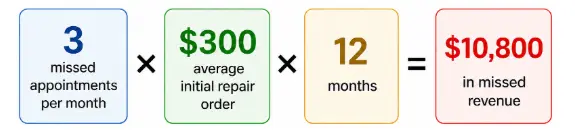
Example only. Actual results will depend on the shop’s repair order value, website traffic, and customer retention.
Your Website Is Part of Every Marketing Channel
Customers do not always discover an auto repair shop through its website. They may first see a Google ad, notice a social media post, receive a recommendation, or find the shop through its Google Business Profile.
However, many of those customers will still visit the website before making a decision.
They may want to confirm:
- The shop provides the service they need.
- The business works on their type of vehicle.
- The shop is located nearby.
- The hours fit their schedule.
- Other customers have had positive experiences.
- The business looks professional and trustworthy.
- Scheduling an appointment will be simple.
A poor website can weaken the performance of every other marketing channel. Even a strong referral may not result in an appointment if the website creates doubt.
Google Analytics key events and attribution
How Customers Evaluate an Auto Repair Website
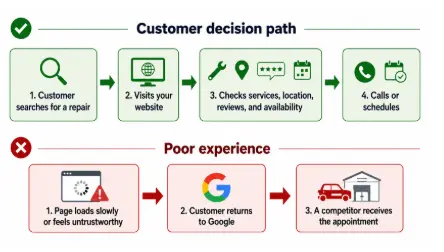
When someone searches for “auto repair near me” or “brake repair in [city],” they may compare several businesses within a few minutes.
A potential customer is unlikely to study every page of your website. They want quick answers and a clear next step.
Within a few seconds, visitors should be able to find:
- Your shop’s name and location
- Your phone number
- A prominent appointment button
- Your main services
- Your hours
- Reviews or other trust signals
- Reasons to choose your shop
If those details are buried, confusing, or missing, the customer may return to Google and choose another business.
The Most Common Auto Repair Website Mistakes
Slow Load Time
Customers should not have to wait for oversized images, videos, or unnecessary website features to load.
Google’s Core Web Vitals guidance recommends that a page’s main content appear within approximately 2.5 seconds. Google also evaluates responsiveness and whether page elements unexpectedly shift while someone is trying to read or click.
Common causes of a slow website include:
- Large, uncompressed photos
- Autoplaying videos
- Cheap or underpowered hosting
- Too many plugins
- Unnecessary tracking scripts
- Outdated website software
Shop owners can use Google PageSpeed Insights to test individual pages and identify potential performance issues.
Poor Mobile Experience
A website may look fine on a desktop computer but become difficult to use on a phone.
Google recommends evaluating whether content displays well on mobile devices as part of the website’s overall page experience. It also advises businesses to consider security, intrusive popups, Core Web Vitals, and whether the main content is easy to identify.
On a mobile website, visitors should be able to:
- Read the text without zooming in
- Tap the phone number
- Find the appointment button
- Navigate with one hand
- View the address and hours
- Complete a short appointment form
- Avoid popups that block the page
Missing or Weak Calls to Action
Visitors should never have to search for a way to contact the shop.
A clear call to action tells them exactly what to do next. Depending on the shop’s scheduling process, that may be:
- Call Now
- Schedule an Appointment
- Request an Estimate
- Text Our Shop
- Get Directions
Place a primary call to action near the top of the homepage and repeat it naturally throughout the website. On mobile devices, consider using a click-to-call or appointment button that remains visible as the visitor scrolls.
Avoid vague buttons such as “Learn More” when the desired action is to schedule service.
Measure form performance with Google Analytics
No Proof of Trust
New customers are being asked to hand over their keys and approve work they may not fully understand. Before doing that, they need a reason to trust the business.
Useful trust signals include:
- Customer reviews
- Real photos of the shop and team
- Warranty information
- ASE certifications
- Years in business
- Community involvement
- Professional affiliations
- Financing options
- Digital vehicle inspections
Google notes that reviews can help a business stand out and provide useful information to potential customers. Businesses can also reply to reviews and share direct links to individual reviews.
Do not place every testimonial on a separate reviews page that few visitors will open. Add relevant reviews near important service sections, appointment forms, and calls to action.
Thin or Missing Service Pages
A short list of services on the homepage does not always provide enough information for customers or search engines.
Individual pages for major services can explain:
- Common warning signs
- What the service includes
- Related repairs that may be needed
- Why customers should choose that shop
- How to schedule an appointment
Depending on the services offered, a shop might create dedicated pages for:
- Brake repair
- Oil changes
- Check engine light diagnostics
- Wheel alignment
- Transmission service
- Diesel repair
Each page should provide useful information rather than repeating the same generic wording with a different service name.
Inconsistent Business Information
The shop’s website and Google Business Profile should display matching information, including:
- Business name
- Address
- Phone number
- Hours
- Website
- Services
- Location details
A verified Google Business Profile allows a business to manage information displayed in Google Search and Maps, including its phone number, website, hours, location, photos, and customer reviews.
Inconsistent information can confuse customers and create unnecessary friction during the scheduling process.
What a Strong Auto Repair Homepage Should Include
Your homepage should quickly explain who you are, what you do, where you are located, and what the visitor should do next.
A strong homepage usually includes:
A Clear Opening Message
The first section should identify the business, location, and primary value to the customer.
For example:
Dependable Auto Repair in [City, State]
Complete maintenance, diagnostics, and repair from a local team that puts your safety first.
Prominent Contact Options
Include a visible phone number and appointment button near the top of the page. Mobile visitors should be able to call with one tap.
Main Services
Feature the services customers request most often, then link each one to a more detailed page.
Trust Signals
Display reviews, warranty information, certifications, real shop photos, and other reasons customers can feel confident choosing the business.
Location and Hours
Make the address, hours, map, and directions easy to find. Multi-location businesses should have a separate page for each shop.
A Clear Reason to Choose the Shop
Explain what makes the business different. This might include:
- A customer-first approach from check-in to pickup
- Supportive service from people who care about the customer’s time
- Digital inspections with photos
- Loaner vehicles or shuttle service
Avoid relying on generic claims such as “quality service” or “experienced technicians” without supporting details.
What Should Your Auto Repair Website Track?
A website should not be judged only by how it looks. It should also be evaluated by how effectively it produces customer actions.
Important website conversions may include:
- Phone calls
- Appointment requests
- Click-to-call taps
- Text messages
- Chat leads
- Direction requests
- Clicks from the Google Business Profile
- Leads generated by specific service pages
- Conversions from Google Ads landing pages
Tracking these actions helps shop owners understand which pages and marketing channels contribute to appointments.
For example, a blog may attract visitors, but a brake repair page may produce more phone calls. Without proper tracking, the shop may not know which content is influencing actual business.
Try This Five-Minute Website Test
Shop owners can perform a simple review without any special software:
- Open the website on your phone using cellular data instead of Wi-Fi.
- Check how quickly the main content becomes visible.
- Try to call the shop using one hand.
- Find the appointment button.
- Look for one specific service.
- Confirm the shop’s address and hours.
- Find a customer review or trust signal.
- Check whether the text is easy to read.
- Submit a test appointment form.
- Ask whether a first-time customer would understand why this shop is different.
Have someone who does not work at the shop perform the same test. Employees may already know where everything is located, while a new visitor does not.
Stop Treating Your Website Like a Digital Brochure
Your website is not an isolated marketing project. It is where potential customers evaluate the promises made through your Google Business Profile, ads, social media, reviews, referrals, and other marketing efforts. It can become an operational marketing asset.
When the website is slow, confusing, or unconvincing, each of those channels becomes less effective.
When the website is fast, professional, trustworthy, and easy to use, it can turn more of the attention you are already earning into scheduled appointments.
A strong auto repair website should do more than prove your business exists. It should show customers why they can trust your shop and make it simple for them to take the next step.